Define Joins
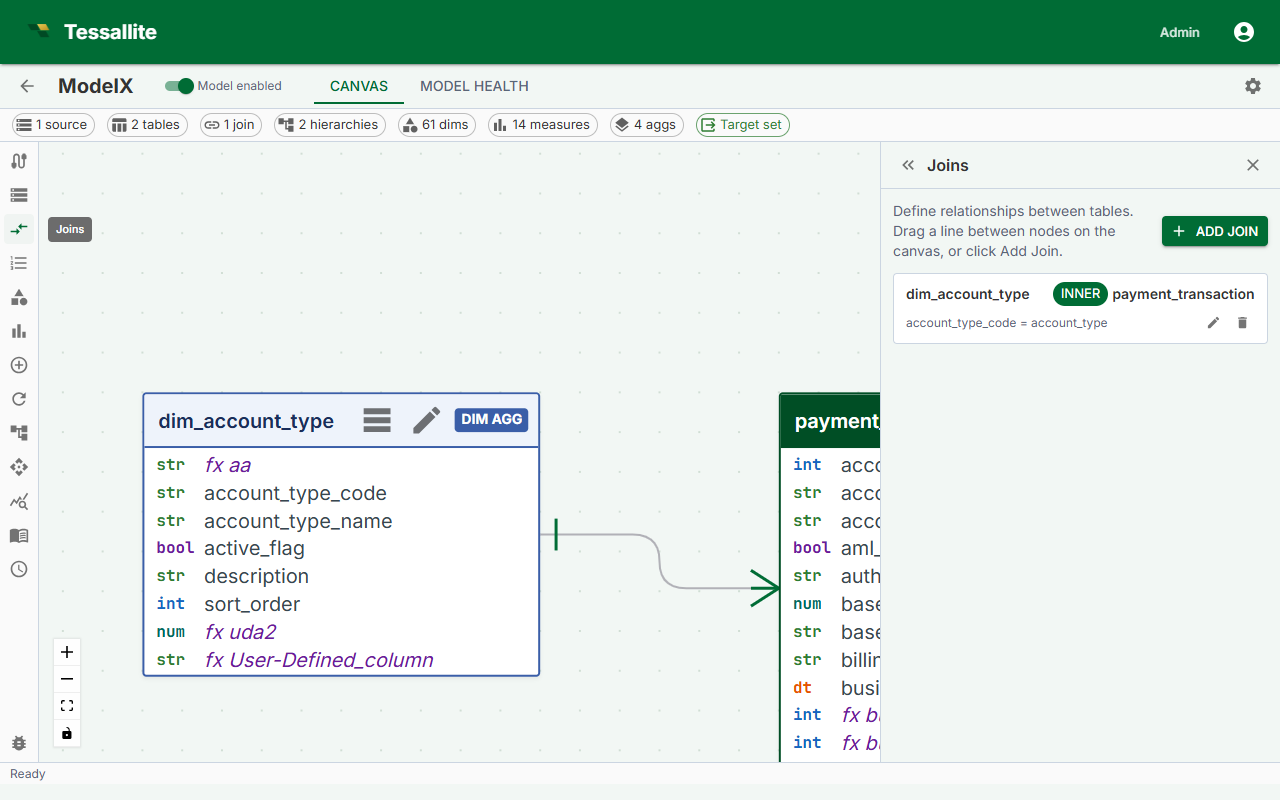
What this covers
Joins tell Tessallite how tables relate to one another. Without joins, the query router cannot construct the SQL needed to pull dimension attributes into aggregate GROUP BY queries. This article covers the join creation flow, join properties, how to choose a join type, how cardinality differs from it, structural constraints, and how to edit or delete a join.
Before you start
- All tables involved in a join must already be added to the model. See Add Tables to a Model.
- You must know the foreign key relationship: which column in one table corresponds to the primary key in the other.
Steps
- Open the Model Builder for the project.
- In the Toolbelt, click Add Join. Alternatively, drag from one table card to another in the Canvas.
- In the Drawer, set the Left table and Left column (the many-side, typically the fact table).
- Set the Right table and Right column (the one-side, typically a dimension table).
- Choose the Join type: Inner, Left outer, Right outer, or Full outer. This answers which rows survive.
- Optionally choose the Cardinality: many-to-one, one-to-many, one-to-one, or many-to-many. This answers how many rows on each side match. It never changes the SQL Tessallite writes; it tells Tessallite whether joining this table can duplicate rows.
- Choose the Population role that describes whether this join is meant to change which rows count in the model.
- Click Save Join. A line appears in the Canvas connecting the two table cards, labeled with the join type.
Join properties
| Property | Description |
|---|---|
| Left table | The table on the left side of the ON clause. |
| Left column | The foreign key column in the left table. |
| Right table | The table being joined to. Typically a dimension table. |
| Right column | The primary key or join key column in the right table. |
| Join type | Inner, Left outer, Right outer, or Full outer. Controls which rows survive the join. |
| Cardinality | Optional. How many rows on each side match. Does not change the SQL. |
| Population role | Whether filtering or adding rows through this join is an intended part of the model. |
Choosing a join type
The join type decides which rows survive. Pick the one that keeps every fact row.
| Type | Keeps | Use it when |
|---|---|---|
| Inner | Only rows that match on both sides | You are certain every fact row has a matching dimension row |
| Left outer | Every row from the left table | The left table is your fact table |
| Right outer | Every row from the right table | The right table is your fact table (you drew the join dimension-first) |
| Full outer | Every row from both sides | Rare; you genuinely need unmatched rows from both tables |
The rule of thumb: keep the fact rows. Whichever side your fact table is on, choose the outer join that preserves it. If you drew the join fact-first (fact on the left) that is Left outer; if you drew it dimension-first (fact on the right) that is Right outer. Both describe the same relationship — Tessallite writes whichever SQL keyword preserves the fact table once it decides which table to start the query from.
Use Inner only when you are certain every fact row has a matching dimension row. A misapplied Inner join produces totals lower than expected with no error message.
Worked example. A payments model has 100,000 transactions. Only 16,722 of them are card payments, so only those have a card_entry_mode. If the join to dim_card_entry_mode preserves the dimension instead of the fact, every report that so much as mentions the card entry mode silently answers for 16,722 transactions while every other report answers for 100,000 — and the two never agree on their own grand total. Preserving the fact instead keeps all 100,000, with a blank entry mode on the non-card rows, which is the honest answer.
Every dimension table must be reachable from the fact table through a join path. A dimension table with no join connection will trigger a warning in the Health tab and cannot be used in aggregate queries.
Cardinality (optional, and separate)
Cardinality is a different question from join type. Join type asks which rows survive; cardinality asks how many rows on each side match.
| Cardinality | Meaning |
|---|---|
| Many to one | Many rows in the left table match one row in the right table. The usual fact-to-dimension shape. |
| One to many | One row in the left table matches many in the right. |
| One to one | At most one row on each side. |
| Many to many | Rows can match many-to-many. Tessallite cannot prove such a join leaves totals unchanged. |
Declaring it never changes the SQL. What it does is tell Tessallite whether adding this table to a query can duplicate fact rows — which is what decides whether a summary table or a pocket table is allowed to answer a query instead of the source. Leaving it blank is safe; Tessallite simply falls back to the source database more often.
These two properties used to share one field, so a join labelled "many to one" was carrying a fan-out description in the slot that decides which rows survive. Older models may still show that; re-open the join, pick a real join type, and set the cardinality separately.
Choosing a population role
The population role tells Tessallite whether this join is meant to change which rows count. It is separate from join type and cardinality.
| Population role | Choose it when |
|---|---|
| Keep base rows (default) | The join supplies optional labels or details and should not decide which base rows belong in the model. |
Defines the population (population_defining) | The join deliberately decides which rows belong, such as keeping only completed orders. Tessallite includes both endpoints and any connector path in source SQL and materialisation plans, even when the query projects only fact fields. |
Adds detail only (enrichment_only) | The join may add matching detail rows, and that extra detail is expected. It remains eligible for elision; this declaration excuses multiplication during validation, not filtering. |
| Not decided yet | You are not ready to make the decision. Tessallite keeps the join visible for review in Population governance. |
After a model is published, the Population governance banner reports whether each join behaved as declared. A warning means the source data changed row counts in a way that needs review. Open the join to compare the declaration that was checked with its current value, then publish again after correcting it.
Serving and upgrades
The population role is part of the deployed model snapshot. Source queries, aggregate creation and refresh, and pocket population checks use the same declared role, so a population_defining join cannot disappear simply because no selected column comes from its dimension. preserve_base_rows, enrichment_only, and undeclared remain eligible for normal projection-based elision. If an imported bundle contains an unknown role, Tessallite treats it as undeclared rather than assuming that it is safe or mandatory.
When the serving contract is upgraded, Tessallite advances the deployed model epoch and marks older aggregates, pockets, and Named Query artifacts stale. Those artifacts cannot serve until rebuilt under the current snapshot; an operator does not need to trigger a manual refresh to make the safety fence effective.
Structural constraints
- Star or snowflake only. Joins radiate outward from the fact table. Cycles are not allowed.
- No fact-to-fact joins. Joins between two
facttables are not supported. Use two separate projects or pre-join the tables in the source. - One join per table pair. Only one join can exist between any two tables.
The Health tab shows errors for constraint violations. The model cannot be published while errors are present.
The Joins panel also renders validation warnings returned for each saved join directly on its card. These warnings remain visible in read-only mode.
Editing a join
Click the join line in the Canvas to open it in the Drawer. Edit any property and click Save Join.
Deleting a join
Click the join line in the Canvas, then click Delete Join in the Drawer. Dimensions or measures relying on columns in the disconnected table will produce Health tab errors until the join is restored or those objects are removed.
Auto-hide of dimension join keys
When a join is created between a fact table and a dimension table, Tessallite automatically hides the dimension-side join key column. This prevents the same attribute from appearing twice in the virtual schema (once from the fact table's foreign key and once from the dimension table's primary/join key).
How it works:
| Event | What happens |
|---|---|
| Join created (fact to dimension) | The dimension table's join key column is hidden. Any dimension or measure referencing that column is also hidden. |
| Join deleted | If the column was auto-hidden (not manually set by the user), it becomes visible again. If other joins still reference the column, it stays hidden. |
| Join columns changed | The old dimension-side column is restored to visible; the new dimension-side column is hidden. |
Manual override. You can always change the visibility of any column manually. Open the table card in the Canvas, click the column, and toggle the Hidden checkbox.
- If you manually show an auto-hidden column, the system records your choice. Deleting the join later will not re-hide it.
- If you manually hide a column, creating a join through that column will not change your setting.
The auto-hide rule only applies to fact-to-dimension joins. Joins between two dimension tables (snowflake joins) do not trigger auto-hide.