Dimensions and Measures
What this covers
This article explains what dimensions and measures are, how they map to source columns, what role they play at query time, and the key distinction between additive and non-additive measures.
Dimensions
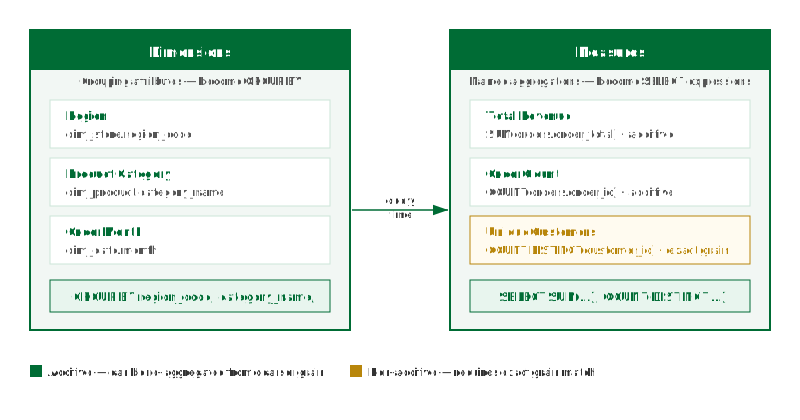
A dimension is a named grouping attribute. It is defined by pointing to a column in one of the model's source tables and giving it a logical name that BI tools and users will see. For example, a dimension called Region might map to dim_store.region_code, and Product Category might map to dim_product.category_name.
At query time, dimensions translate to GROUP BY clauses. When a BI tool issues a query grouped by Region, Tessallite maps that to GROUP BY dim_store.region_code.
Dimensions also define the grain of an aggregate. The grain is the set of dimensions at which the aggregate was pre-computed. A query can only be served by an aggregate if the aggregate grain is a superset of the dimensions requested by the query.
Measures
A measure is a named aggregation. It is defined by selecting an aggregation function and a source column, then giving the result a logical name. For example, Total Revenue might be SUM(orders.order_total), and Order Count might be COUNT(orders.order_id).
At query time, measures translate to aggregate expressions in the SELECT list. Every measure in a model must be explicitly named — anonymous expressions are not permitted. This ensures Tessallite can match query requests to specific aggregate columns without ambiguity.
Measures are exposed through the JDBC gateway as computed columns and through the XMLA gateway as measures in the OLAP cube.
Aggregation types
| Aggregation | Additive | Requires exact grain match | Example use |
|---|---|---|---|
SUM | Yes | No | Total revenue, total quantity sold |
COUNT | Yes | No | Number of orders, number of events |
AVG | No | Yes | Average order value, average session duration |
MAX | Yes | No | Highest single-order value, latest event timestamp |
MIN | Yes | No | Earliest date, lowest price observed |
COUNT DISTINCT | No | Yes | Unique customers, unique SKUs sold |
Additive vs non-additive measures
An additive measure can be correctly re-aggregated from a coarser grain. If an aggregate stores SUM(order_total) at the Region + Month grain, a query that requests the total for a full year can sum the monthly rows and get the correct answer. The router can serve a finer-grained query from a coarser aggregate for SUM, COUNT, MAX, and MIN.
A non-additive measure cannot be combined this way:
- AVG: the average of a set of averages is not the overall average unless the group sizes are equal.
- COUNT DISTINCT: the union of distinct counts from two partitions can double-count values that appear in both.
For non-additive measures, Tessallite requires an exact grain match. The aggregate must have been built at exactly the grain the query requests. If no exact match exists, the query falls through to raw data.
COUNT DISTINCT is the most common source of unexpected fallthrough to raw data. Define an aggregate explicitly at the grain used by your most frequent COUNT DISTINCT queries.
Hidden columns and aggregate expressions
A model may mark certain columns as hidden. Hidden columns are excluded from the business view — they do not appear in the BI tool's field list and cannot be placed directly in a SELECT clause.
However, hidden columns can still participate in aggregate expressions and WHERE filters. When a query wraps a hidden column inside an aggregate function such as SUM(), AVG(), COUNT(), MAX(), or MIN(), the query router resolves it as a measure reference rather than as a bare column request. The persona scope gate does not block it because the column never appears as a standalone value in the result set — only the aggregated result does.
Example. Suppose fee_amount and base_amount are hidden columns (measures) in a model. The following queries behave differently:
| Query | Result |
|---|---|
SELECT fee_amount FROM modely | Rejected — fee_amount is hidden and cannot appear as a bare column in the SELECT list. |
SELECT SUM(fee_amount) FROM modely | Allowed — SUM(fee_amount) is an aggregate expression. The router resolves fee_amount as a measure reference and computes the sum. |
SELECT SUM(fee_amount) / SUM(base_amount) FROM modely | Allowed — both columns are inside aggregate functions. The router treats the entire expression as a compound passthrough and preserves it in the rewritten SQL. |
SELECT * FROM modely WHERE fee_amount > 100 | Allowed — fee_amount in the WHERE clause is used as a filter, not a result column. Hidden columns may appear in filters. |
This design lets modellers keep internal detail columns (like individual fee components) out of end-user reports while still allowing those columns to power calculated measures and compound aggregate formulas.
Attribute relationships
A dimension often carries more than one column that describes the same member — a country dimension keyed on country_code may also hold country_name. When two such columns are genuinely interchangeable (a one-to-one, or bijection, mapping), a modeller can declare an attribute relationship between them. Once Tessallite proves the mapping holds across the real data, a query grouped by one column can be served from an aggregate built on the other, with identical results and no re-computation. The relationship is proven before it is trusted and fails closed to the source path whenever the mapping is unproven, ambiguous, or stale — so a declaration can never produce a wrong answer.
An attribute relationship is a separate, explicit act. Choosing a display column for a dimension caption does not declare one and produces no routing acceleration. See Dimension Attribute Relationships for the full concept, the one-to-one versus many-to-one distinction, null handling, and a worked example.
How dimensions and measures appear in the Model Builder
In the Model Builder Canvas, each table node lists its defined dimensions and measures. The Toolbelt on the left allows you to add, rename, or remove them. The Drawer on the right shows the full definition of whichever object is selected — source column, aggregation type, and logical name.
The Summary Bar at the bottom of the canvas shows a count of total dimensions and measures in the model. This count is used during Health checks to verify that no measures are defined on non-numeric columns.