Query Routing
What this covers
This article explains how Tessallite decides whether a query is answered from a pre-computed summary or from the governed source path. It covers the routing conditions, the behaviour of non-additive measures, and what happens when no summary matches.
The routing decision
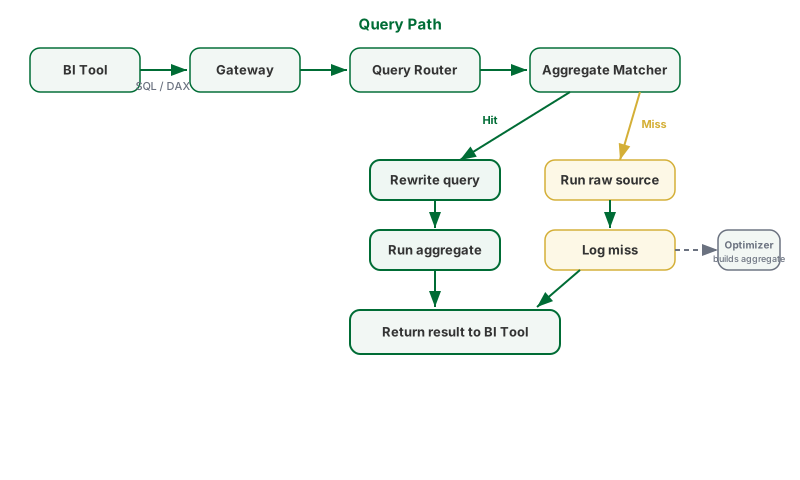
Tessallite routes a query to a pre-computed aggregate when all three of the following conditions are true.
The aggregate's grain is a superset of the query's grain. The grain is the combination of dimensions at which an aggregate was computed. If a query asks for sales by country, an aggregate computed at country level satisfies the condition. An aggregate computed at city level does not — routing to a finer grain would require re-aggregating, which is not valid for all measure types — except where a proven one-to-one (bijection) relationship lets the aggregate's key be relabelled to an equivalent detail column without re-aggregating (see Relabelled grain matches below).
All measures the query requests exist in the aggregate. A query asking for revenue and unit count cannot be routed to an aggregate that contains only revenue.
Any column the query uses to filter is part of the aggregate's grain. If a query filters by product category, the aggregate must have been computed with product category as a dimension.
If any one of these conditions is not met, the query runs through the governed source path.
Non-additive measures
COUNT DISTINCT and other non-additive operations require an exact grain match. A coarser aggregate cannot be used even if it covers all the requested dimensions. Distinct counts cannot be re-aggregated from a summary computed at a coarser grain: summing the distinct counts from two regions does not yield the correct distinct count for the combined total. The query falls through to the source path unless the aggregate was computed at exactly the same grain.
Relabelled grain matches
Sometimes a query groups by a column that is not the column an aggregate was built on, yet the two columns describe exactly the same members. A country dimension might be keyed on country_code, and an aggregate built at the country_code grain, while an analyst asks for the same totals grouped by country_name. Grouping by the code and grouping by the name produce the same set of groups — only the labels differ.
When a modeller has declared a one-to-one (bijection) relationship between the two columns, and Tessallite has proven that mapping against the real data, the router can serve the country_name query directly from the country_code aggregate. It reads the pre-computed rows and simply relabels each group's key with the matching detail value. Because the two columns split the data identically, the result is the same as running the query against the source — same rows, same totals, and even the same distinct counts and medians, since no groups were merged.
Three points make this safe:
- Identical results. A bijection is an exact relabel, not a roll-up. Every statistic is preserved, including the non-additive ones that a coarser aggregate could never serve.
- Proven, not assumed. The relationship is checked across the complete data before it is ever used. A declaration alone changes nothing.
- Fail-closed. Whenever the relationship is unproven, disabled, ambiguous, stale, involves null values, or the query carries row-level security, the router does not relabel — it runs the ordinary source path and returns the correct answer.
This capability is controlled by administrator settings and is separate from ordinary superset matching. A many-to-one relationship (many keys sharing one detail) is a genuine roll-up and follows the additive-measure rules above, not the exact-relabel path. See Dimension Attribute Relationships.
What happens on a miss
When no suitable aggregate exists, the query runs through the governed source path. The miss is logged with the query's grain and measure pattern. The Optimizer reads the miss log. When the same pattern appears frequently enough, the Optimizer creates a new aggregate. Future queries matching that pattern are routed to the new aggregate.
Hit rate
The hit rate is the proportion of queries that were served from an aggregate rather than the source path. A higher hit rate indicates that more queries are being answered without scanning detailed source rows. The hit rate metric is visible in the Diagnostics panel of the Model Builder.
Grain
The grain of a query is the finest level of detail it requests. A query asking for total sales by country and year has a grain of (country, year). A query asking for a grand total with no grouping has a grain of () — the empty set. An aggregate's grain is the set of dimensions it was computed over.
Routing conditions reference
| Condition | Required for routing to aggregate |
|---|---|
| Aggregate grain is a superset of query grain | Yes |
| All requested measures present in aggregate | Yes |
| All filter columns are part of the aggregate grain | Yes |
| Exact grain match | Only for non-additive measures (COUNT DISTINCT) |
Raw route (ungrouped queries)
Some BI tools, including Power BI Desktop, send queries with no GROUP BY clause. These queries request individual rows rather than aggregated totals. Tessallite detects this pattern and routes the query through a dedicated raw path that returns flat, unaggregated rows from the source database.
When the raw route activates: The gateway classifies a query as "raw" when (1) the SQL has no GROUP BY clause, and (2) the SELECT list is made of plain columns (or *) with at least one non-measure column. A query like SELECT region, amount FROM model activates the raw route. A query like SELECT COUNT(*) FROM model does not — it routes to the source path because every column is an aggregate function. Anything more complex — window functions, subqueries, CTEs, DISTINCT, expressions, or an explicit aggregate mixed with plain columns — takes the normal routing flow instead, which handles those shapes correctly.
How the raw route works: The query-router builds a LEFT JOIN tree from the model's join graph, projects each requested column from its physical source table, and returns individual rows. Measures appear as their underlying column values, not wrapped in SUM or AVG. Time-variant measures and the internal row-count column emit typed NULL values because they have no meaningful per-row representation. Filters are applied even when the filtered field is not in the SELECT list. If a WHERE clause contains a predicate the raw builder cannot faithfully reproduce (for example a column-to-column comparison), the query falls back to the source path, which preserves the original WHERE exactly — the platform never drops a filter silently.
Schema preservation: If a requested column belongs to a table that is not reachable through the join graph, the column still appears in the result as a typed NULL (CAST(NULL AS TEXT) for text, CAST(NULL AS NUMERIC) for numbers). This keeps the result schema stable regardless of which tables are connected.
Row security: Row-level security rules are applied to raw-route queries. If a user's persona restricts which rows they can see, the WHERE clause is injected after the raw SQL is generated.
Cache keys: Raw queries are cached separately from grouped queries for the same model. A raw SELECT * FROM modelx does not share a cache entry with a grouped SELECT region, SUM(amount) FROM modelx GROUP BY region.
Route badge and force-live toggle
The Query panel shows a badge on every executed query so you can see which path served it. The badge reads aggregate, pocket, or live (source). Hovering the badge reveals the routing reason — the same text the /explain endpoint returns — so you do not need a second round-trip to understand why a query took its path.
The Force Live toggle, sitting next to the Execute button, forces the next query to bypass the aggregate and pocket matchers and run directly against the source. Use it when you need to verify raw-source behaviour or compare pre-computed results against the underlying data. Row security is still applied — the force-live switch does not grant access to rows the principal would otherwise be filtered away from.
Force Live is a per-query flag. It resets to off on panel reload and never becomes the default for a model.