Roles and Permissions
What this covers
This article describes the four roles in Tessallite, what each role can do, and how roles are assigned and take effect.
The four roles
System Admin
The System Admin manages the Tessallite installation itself. There is one system admin per installation. This role is defined by environment variables set during deployment — it is not stored in the application database and cannot be created or removed through the interface.
The System Admin can:
- Create and list workspaces
- Create users within any workspace
- Access the System Administration screen
The System Admin cannot access workspace-level content, including projects, models, and data.
Tenant Admin
The Tenant Admin manages users and settings within a single workspace. Multiple users in the same workspace can hold the Tenant Admin role.
The Tenant Admin can:
- Invite and remove users
- Assign roles to users within the workspace
- Configure workspace settings
Modeller
The Modeller builds and maintains data models. This role is assigned per project within a workspace.
The Modeller owns the full model lifecycle within a project. The Modeller can:
- Create, rename, import, export, deploy, and delete models
- Define tables, joins, dimensions, and measures
- Configure aggregates and refresh schedules
- Configure the project's conversational agent
- Rename a project
- View diagnostics and model health
- Run queries and view results
The Modeller cannot perform project- or tenant-level structural actions:
- Create, delete, or enable/disable a project
- Manage source connections, LLM providers, or branding
- Manage user access control, audit, webhooks, or SSO mappings
These are Tenant Admin actions. In the project setup drawer a Modeller sees only the agent-configuration tabs; the administration sections are hidden.
Analyst / Viewer
The Analyst connects BI tools and queries data. This role is assigned per project.
The Analyst can:
- Connect via JDBC or XMLA
- Run queries
- View data returned by the model
The Analyst cannot:
- Edit models, dimensions, measures, or joins
- Add or remove data sources
- Manage users
How roles are assigned
The Tenant Admin assigns workspace-level roles (Tenant Admin) from the Admin panel. Project-level roles (Modeller, Viewer) are assigned from the project's Access settings.
Role changes take effect immediately. There is no caching or delay.
Role hierarchy
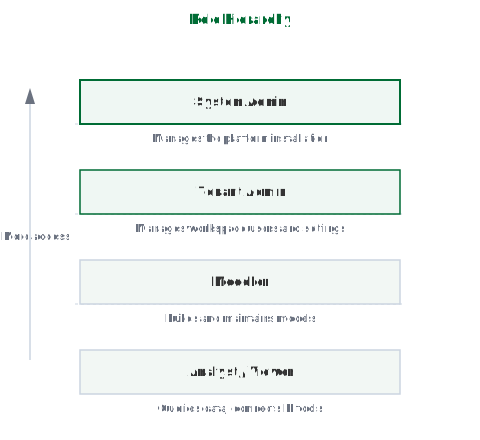
Roles are ordered from lowest to highest access:
Analyst → Modeller → Tenant Admin → System Admin
A user with a higher role holds all capabilities of the roles below it in the hierarchy.
Permissions reference
| Action | System Admin | Tenant Admin | Modeller | Analyst |
|---|---|---|---|---|
| Create workspaces | Yes | No | No | No |
| Manage workspace users | No | Yes | No | No |
| Create / delete project | No | Yes | No | No |
| Enable / disable project | No | Yes | No | No |
| Rename project | No | Yes | Yes | No |
| Manage source connections / branding | No | Yes | No | No |
| Manage user access control | No | Yes | No | No |
| Create / rename / deploy / delete models | No | Yes | Yes | No |
| Configure aggregates | No | Yes | Yes | No |
| Configure conversational agent | No | Yes | Yes | No |
| Connect BI tools | No | Yes | Yes | Yes |
| Run queries | No | Yes | Yes | Yes |
A higher role can do everything the roles to its right can do. The model-service enforces every action server-side; the interface additionally hides controls a role cannot use.
Explorer operation matrix
This is the complete list of what each role can do in the Explorer — the screen where you browse projects, open models, and reach the project setup drawer. Viewer is the read-only role (also called Analyst). Yes means the control appears and works for that role; No means it is hidden, and the server would refuse the action even if it were reached another way.
Each role includes everything the role to its left can do: a Modeller can do everything a Viewer can, and a Tenant Admin can do everything a Modeller and Viewer can.
Browse and query
| Operation | Viewer | Modeller | Tenant Admin |
|---|---|---|---|
| Browse projects and models | Yes | Yes | Yes |
| Run queries and view results | Yes | Yes | Yes |
Workspace and project actions
| Operation | Viewer | Modeller | Tenant Admin |
|---|---|---|---|
| Create a project | No | No | Yes |
| Delete a project | No | No | Yes |
| Enable or disable a project | No | No | Yes |
| Import or export a project | No | No | Yes |
| Rename a project | No | Yes | Yes |
Project setup drawer
| Section | Viewer | Modeller | Tenant Admin |
|---|---|---|---|
| Open the drawer | No | Yes | Yes |
| Agent configuration tabs | No | Yes | Yes |
| Source connections | No | No | Yes |
| LLM providers | No | No | Yes |
| Branding | No | No | Yes |
| User access control | No | No | Yes |
| Audit log, webhooks, SSO mappings, security audit | No | No | Yes |
A Modeller who opens the drawer sees only the agent-configuration tabs. The administration sections do not appear.
Model actions
| Operation | Viewer | Modeller | Tenant Admin |
|---|---|---|---|
| Add a model | No | Yes | Yes |
| Rename a model | No | Yes | Yes |
| Import or export a model | No | Yes | Yes |
| Deploy or undeploy a model | No | Yes | Yes |
| Delete a model | No | Yes | Yes |
A Modeller owns the full model lifecycle — including deleting a model — because that is part of building and maintaining a model. Project-level structure (creating, deleting, or disabling a project) stays with the Tenant Admin.