Named Queries
What this covers
The Named Queries panel in Model Builder is one place to create and manage three kinds of reusable, named objects. Each is referenced by an @name, and each suits a different way of connecting. A kind selector at the top of the panel switches between them:
| Kind | What it is | Where users reach it | How it is referenced |
|---|---|---|---|
| MDX Named Sets | A saved set of dimension members, evaluated in the XMLA engine at query time. | Excel PivotTable, Power BI (XMLA). | CUBESET / CUBERANKEDMEMBER formulas. |
| Tessallite Named Lists | A stored list of member values that expands into an IN (...) clause. | SQL / JDBC / REST. | ... WHERE col IN (@ListName) |
| Named Queries | A saved whole-table question whose answer is materialised and served directly. | SQL / JDBC / REST, and the XMLA/DAX catalogue (Excel, Power BI). | SELECT * FROM @Name |
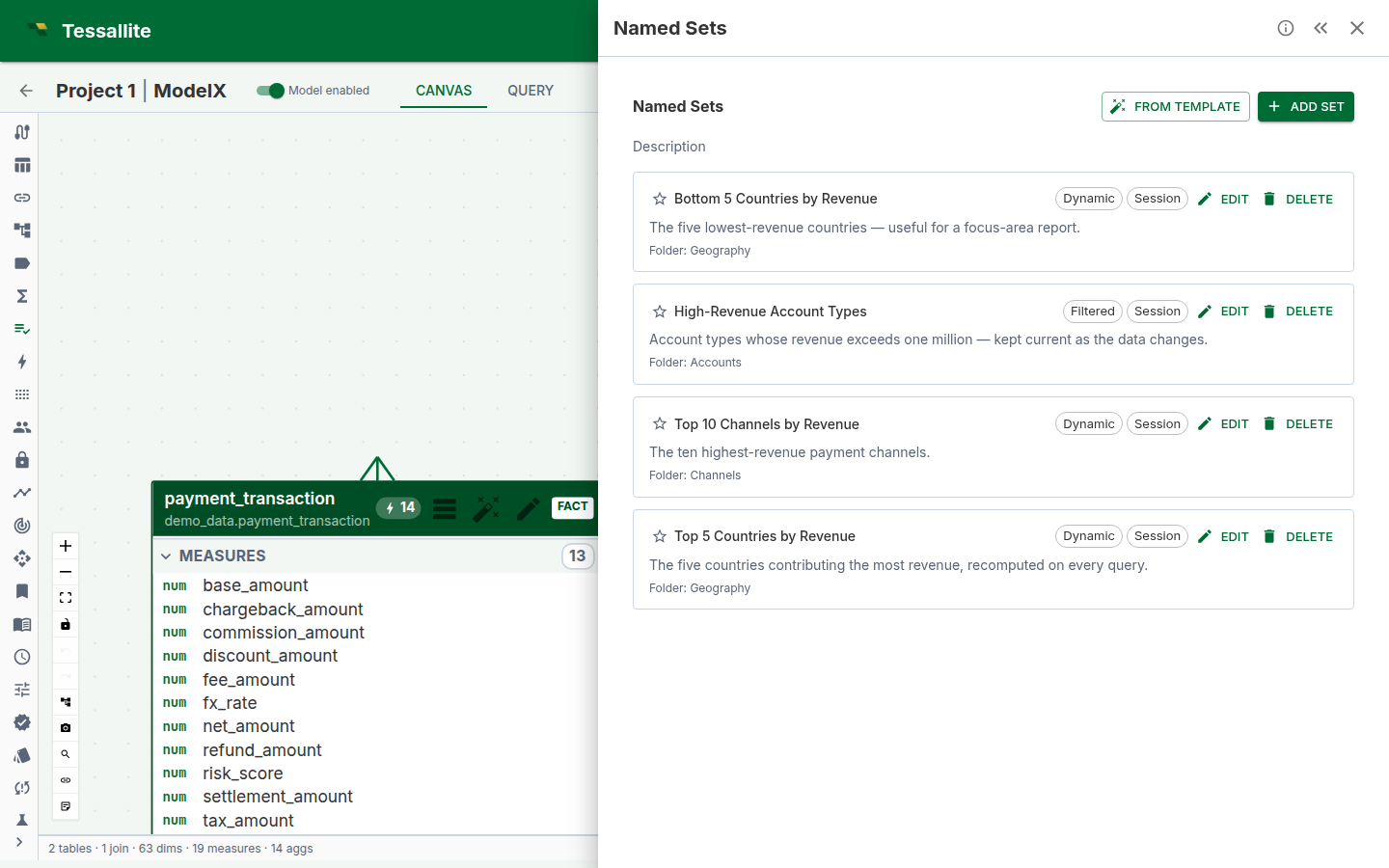
Pick the kind that matches how your users connect: MDX Named Sets for Excel/Power BI member sets, Tessallite Named Lists for SQL filter lists, and Named Queries when you want a whole named table served fast. This article covers all three, then the governance they share.
The panel in Model Builder
Open a model in Model Builder and open the Named Queries panel. The kind selector at the top chooses which kind you are looking at; the list below shows the existing objects of that kind as cards. Each card shows the object's name, a kind chip and a channel badge, its status or health, its display folder, and a plain-language description, plus Edit and Delete actions gated by your role (a modeller authors and edits; deploy follows the model's deploy permission). Add opens the editor for the selected kind.
All three kinds are governed model content: they travel in the model's deployed snapshot, follow the same certification lifecycle, and only reach users after the model is deployed (see *Certification and governance* and *Deploy semantics* below).
Deployed vs. Define: two views of the same MDX Named Sets
The panel that opens MDX Named Sets from the toolbelt shows two tabs: Deployed and Define.
- Define is the authoring surface described in the rest of this page — the live list you edit, backed by whatever is currently saved to the model's draft, whether or not it has been deployed yet.
- Deployed is a read-only viewer of exactly what BI tools currently see: only sets that belong to the last deployed model version, grouped by folder, with a certification filter. It exists so a modeller can check what Excel and Power BI actually query right now without leaving Model Builder, opening a separate BI client, or guessing whether an edit has gone live.
This split matters because editing a definition never changes what BI tools see until you deploy (see Deploy semantics below) — a set you just created or renamed only appears under Deployed after that deploy completes. If you edit a set and it still looks unchanged in Excel, check Deployed first: if the edit is not there either, the model has not been redeployed since you made it.
The KPI Scorecard panel uses the identical Deployed/Define split for the same reason: separating "what I am authoring" from "what is actually live" for any governed model object.
MDX Named Sets
An MDX Named Set is a reusable collection of dimension members expressed in MDX. It resolves inside the XMLA engine at query time, so it is the right kind for Excel PivotTables and Power BI.
Types
| Type | Description | When to use |
|---|---|---|
| Fixed members | A hand-picked list of specific dimension members. | When the members are stable and known in advance — e.g., a list of strategic accounts. |
| Top N / Bottom N | A list ranking members by a measure and storing the top or bottom N when you Refresh it. | When the membership should track the data but only needs updating on demand — Refresh recomputes and stores the members, then Deploy publishes them; e.g., top 10 products by revenue. |
| Filtered | Members matching one or more conditions on dimension attributes. | When membership is defined by business rules — e.g., customers in a region with orders above a threshold. |
| Advanced MDX | A raw MDX set expression. | When the other builder types cannot express the logic. Preview is not available for raw MDX; deploy and use a BI tool to see results. |
Creating an MDX Named Set
- Open the Named Queries panel and select the MDX Named Sets kind.
- Click Add. The dialog opens with a blank definition form.
- Enter a Name (internal identifier, unique within the model).
- Optionally enter a Display name (the label shown in BI tools) and a Description.
- On the List Rule tab, select the list type — Fixed, Top N, Filtered, or Advanced MDX — and configure the type-specific fields.
- Click Preview to see the resolved members (not available for Advanced MDX).
- Click Create. The set is available to BI tools after the model is deployed.
Using MDX Named Sets in BI tools
After deployment, MDX Named Sets appear in the XMLA metadata catalogue. In Excel, reference them with CUBESET and CUBERANKEDMEMBER; the Tessallite Excel plugin inserts these formulas in one click from the Report Builder panel.
Tessallite Named Lists
A Tessallite Named List stores a list of member values for the SQL path (JDBC, REST, DBeaver). Referenced with @ListName, its members expand into an IN (...) clause before the SQL is parsed.
Definition types
| Definition type | What it does | When to use |
|---|---|---|
| Fixed Members | You enter values manually, one at a time or by pasting CSV. | When the values are known and stable — e.g., a fixed set of country codes. |
| Top N | Queries the source for the top or bottom N dimension members by a measure. | When the list should reflect the current ranking — e.g., top 10 accounts by revenue. |
| Filtered | Queries the source for dimension members matching filter conditions. | When membership is a rule — e.g., products in "Electronics" with stock above 100. |
| Free-hand SQL | You write a SQL query returning a single column of values. | When no built-in builder can express the logic. |
How the compute-and-store model works
For dynamic types (Top N, Filtered, Free-hand SQL), members are not computed on every query. You save the definition, then click Refresh on the List Rule tab: Tessallite runs the definition against the source and stores the resulting values. At query time the stored values expand into the SQL — identical to Fixed Members, with no source query during user queries. Refresh records the member set's last_refreshed_at vintage. Refreshed members are not available to queries until the model is redeployed.
Limits
- Member values per list are capped by
NAMED_LIST_MEMBER_CAP(default 1,000, ceiling 5,000). A refresh returning more is rejected — never silently truncated. - Free-hand SQL must return exactly one column (
SELECT *is rejected) and must contain no DML keywords (INSERT, UPDATE, DELETE, DROP, ALTER, CREATE, TRUNCATE, GRANT, REVOKE).
Using a Tessallite Named List in SQL
Reference a list with @ListName inside an IN or NOT IN clause:
SELECT product_name, SUM(revenue)
FROM   sales
WHERE  channel IN (@ActiveChannels)
GROUP  BY product_name
The router replaces @ActiveChannels with the stored values before parsing (strings single-quoted, numbers bare), so routing, security, and aggregation all work normally. Only IN (...) / NOT IN (...) positions are accepted; any other position is rejected with a clear error.
Named Queries
A Named Query is a saved, named database question whose answer is a whole table. A modeller writes the question once, names it, and every user — in SQL, the Explorer, or a BI tool — asks for it with one line:
SELECT * FROM @top_three_transaction_cities;Tessallite keeps a pre-computed copy of the answer table and serves it directly. If the copy is not ready, or not allowed for a particular user, Tessallite quietly runs the original question live instead — so the answer is always correct, never stale-by-accident.
Think of it as a named answer sheet
| Part | What it is |
|---|---|
| Name | The short reference used in SQL, like @top_three_transaction_cities. |
| Definition | The original question, written in SQL against the model (measures and dimensions), never against the raw database. |
| Materialised result | A real table Tessallite builds by running the definition, stored on the query target. |
| Fallback | If the stored table is not usable, Tessallite runs the definition live against the source instead. |
Shape
A Named Query is one of two shapes, derived automatically at validate time:
| Shape | What it is | Example |
|---|---|---|
| projection | A row-slice: no GROUP BY, no aggregate in the projection. | SELECT * FROM modely WHERE branch_id = '3279863' |
| aggregated | A grouped summary with totals, counts, rankings. | SELECT city_name, SUM(transaction_value) AS total FROM modely GROUP BY city_name ORDER BY total DESC LIMIT 3 |
The shape decides which existing security check Tessallite reuses when serving the stored table (see *Security* below).
Creating a Named Query
- Open the Named Queries panel and select the Named Queries kind, then click Add to open the editor.
- Write the definition. SQL against the model's logical surface — the model slug plus its measures and dimensions — exactly like a pocket definition, never raw database SQL. Tessallite compiles it to whichever dialect is needed at refresh and query time, which is what keeps it portable across PostgreSQL, Redshift, and BigQuery.
- Validate. The editor's Validate step checks the definition binds to the model, shows the derived output columns and shape, and checks the caps. Anything invalid is rejected with the reason — never silently stored.
- Name it. Unique within the model, ignoring case, and not clashing with a model parameter or a Named List: all three share the
@namespace. - Save and deploy the model. A Named Query only reaches users after the model is deployed. Editing a definition does not change what queries see until the next deploy — the editor shows a pending-deploy indicator when a change is waiting.
- Refresh to build the answer table (the editor's Refresh button, or a schedule — see below). The editor shows the last-refreshed time and a health badge (fresh / stale / failed, with the server's reason).
You can also drive all of this through the model-service API under /projects/{project_id}/models/{model_id}/named-queries (validate, create, PATCH, DELETE, POST /{id}/refresh, GET /{id}/refresh/runs) — the editor calls exactly these endpoints.
Validation rules
- A single
SELECTstatement; no DML keywords (defence in depth on top of the router's read-only enforcement). - No other
@placeholders (a Named Query inside a Named Query would never end). - Use semantic model names in every clause. In particular, a
SELECT *definition must order by the semantic name (for example,ORDER BY "Sale Number"), not the physical source-column name (ORDER BY sale_id). Physical names are not part of Named Query SQL and are not translated as a fallback. - Output columns are capped by
named_query.max_columns(default 200); the cap rejects at authoring time — it never silently truncates.
Refreshing (building the answer table)
A Named Query does not materialise itself. A refresh builds the stored table:
- Tessallite takes a per-query lock so only one refresh runs at a time.
- It re-validates the definition against the current deployed model (this is also how a changed model is detected).
- It compiles the definition to the target's dialect and builds the whole result table from scratch (full rebuild in v1).
- It counts the rows and checks the row cap (
named_query.max_rows, default 100,000; a per-query override is allowed). Over the cap, the table is dropped and the query is markedfailedwithROW_CAP_EXCEEDED— rejected, never truncated. - It records the output-column manifest and stamps the build with the model version it was built for. Only then is the result marked
fresh.
A refresh runs manually (the editor's Refresh button, or POST /{id}/refresh) or on a schedule: turn on Refresh on a schedule in the Named Query editor and enter a cron expression (equivalently PUT /{id}/refresh/policy). The scheduler then sweeps due policies automatically, so a materialised Named Query stays current without anyone clicking Refresh. Once the model is deployed, a successful refresh is immediately eligible to serve against that deployed definition when its freshness, binding, overdue, and security gates all pass.
Concurrency, routing, and cleanup
- A refresh holds a per-query lock and takes the shared per-model definition lock around artifact creation, run status, manifest, and freshness writes. Deploy, revert, import, and delete cannot clobber those snapshot-owned rows while a refresh is finalising.
- The refresh freezes the resolved target and source connections at build start. DDL, streaming, row counts, storage/catalogue reads, and oversized-result cleanup all use those frozen endpoints. Finalisation re-checks both bindings; a same-ID target or source repoint fails closed and leaves the artifact non-serving for a later rebuild.
- Model and project deletion capture a refreshed Named Query's physical identity before removing its metadata, then delete the Named Query family before its target rows and drain a qualified cleanup task after commit. A failed target drop remains retryable operator evidence.
Import, clone, and revert
Import and clone paths mint fresh Named Query, artifact, and refresh-policy identities and rebind the physical table name to the destination model. Source physical names, manifests, active runs, build/version bindings, row counts, and source/target routing evidence are cleared; imported queries start stale and must refresh on the destination. A RESTORE/revert of the same model preserves the historical identity and table for a surviving query. If the restored snapshot removes a query, its old physical table is scheduled for cleanup before the metadata rows are replaced.
Health states
| State | Meaning | What serving does |
|---|---|---|
| fresh | The stored table matches the deployed definition. | Serve the stored table (when security allows). |
| stale | The definition or its inputs changed since the last build. | Fall back to running the definition live. |
| failed | The last refresh failed, with the reason recorded. | Fall back to live; if live also fails, a clear error is returned. |
| invalidating | A refresh is running or was interrupted. | Never serve; a new refresh re-picks it after the recovery window. |
A refresh failure never breaks SELECT * FROM @name — the query simply runs live against the source until the next successful refresh.
Fallback analytics
The editor's health area also shows the existing QueryLog timing and byte-cost telemetry attributed to this Named Query: how many requests used the materialised result, how many fell back to the source, and the recorded fallback reasons. When fallback cost telemetry exists, the panel also shows its average execution time and bytes processed; cache-hit sentinel rows are not included in those averages. A sustained expensive fallback is labelled with a Named Query-owned recommendation to repair, refresh, or adjust this query's materialisation. It never recommends creating an aggregate copy; Named Queries and aggregates are separate serving boundaries.
Using a Named Query
From any SQL channel (JDBC, REST, the query panel, Explorer), the whole statement is the reference:
SELECT * FROM @branch_3279863;
SELECT * FROM @top_three_transaction_cities;
Just looking at the first few rows? You can add a LIMIT (and an OFFSET) on the end, and Tessallite honours it:
SELECT * FROM @branch_3279863 LIMIT 20;
SELECT * FROM @branch_3279863 LIMIT 20 OFFSET 40;
This matters more than it looks. Database tools such as DBeaver, and Excel's "view data" button, quietly add a LIMIT to everything you preview — and some of them wrap the name in quotes as well. All of these mean the same thing and all of them work:
SELECT * FROM @branch_3279863 LIMIT 20;
SELECT * FROM @"branch_3279863";
SELECT * FROM "@branch_3279863" LIMIT 20;
Apart from those, the reference has to be the whole statement on its own. Picking out single columns, adding a WHERE, adding an ORDER BY, joining it to something else, or nesting it inside another query are all turned down with NQ_UNSUPPORTED_SHAPE.
That may feel strict, so here is the reasoning. A Named Query is a saved, governed answer. If Tessallite accepted a decorated reference it could not always apply the decoration faithfully — and a query that quietly means something other than what it says is far more dangerous than one that stops and tells you. ORDER BY is the clearest example: the answer can come from a stored table or from a live run, and nothing guarantees those two arrive in the same order, so an ORDER BY that Tessallite ignored would hand you rows in an order you did not ask for and had no way to notice. A clear refusal is the honest answer.
Tip: if you want a filtered or reordered version of a Named Query, make it part of the Named Query's own definition and redeploy. That way everyone who uses the name gets the same governed answer.
Named Queries also appear as first-class tables in the XMLA/DAX catalogue, so Excel and Power BI users see each deployed Named Query as an @name table they can select (subject to the same persona visibility as the model's other tables).
| Error | What it means |
|---|---|
NQ_UNKNOWN_REFERENCE | No Named Query with that name is deployed on the model. Check spelling, or deploy. |
NQ_WRONG_TYPE | The name belongs to a Named List, not a Named Query. |
NQ_UNSUPPORTED_SHAPE | The reference is not the exact whole-statement shape. |
How serving decides: stored table or live?
When a user asks for SELECT * FROM @name, Tessallite runs the same decision every time: is there a fresh stored table, built for the currently deployed model version, within its overdue safety limit, whose security proof holds for this user? If all yes, the stored table serves — fast, no source round-trip. If any no, the definition is dispatched through the ordinary pipeline exactly as if the user had typed it. The user's security context applies on both paths, so the numbers are identical whether the answer came from the stored table or a live run — a row-security-filtered user never sees more rows through a Named Query than by hand.
Security: reused, never reinvented
Named Queries add no new security mechanism; they borrow the two already-hardened proofs, chosen by shape:
- Projection shape reuses the pocket rules: the stored table serves a row-security-filtered user only when the definition is a plain row-slice, every security column is in the manifest, and the same per-scan filter the live route would apply is injected on every read. Anything unproven falls back to live.
- Aggregated shape is more careful: pre-grouped numbers cannot be re-filtered afterwards without wrong answers, so a user with active row security gets the live path (re-aggregated under their own filter).
- A column-level-security (persona) restriction on the result falls back to live — Tessallite will not quietly project columns out of a shared stored table.
Limits and caps
| Cap | Default | Enforced when | Behaviour |
|---|---|---|---|
named_query.max_columns | 200 | Create / validate | Definition rejected, never truncated. |
named_query.max_rows | 100,000 | Refresh (counted on the real result) | Table dropped, marked failed with ROW_CAP_EXCEEDED; serving falls back to live. |
Both can be overridden per Named Query (column_cap / row_cap). The discipline is always reject, never truncate: a truncated answer is a wrong answer.
Worked scenarios
A fixed slice of one branch. SELECT * FROM modely WHERE branch_id = '3279863' (projection). After deploy and refresh, anyone — including a BI tool — runs SELECT * FROM @branch_3279863. A user whose row security allows only branch 4000001 gets the same rows they would by hand — no more.
A top-three ranking on a schedule. SELECT city_name, SUM(transaction_value) AS total FROM modely GROUP BY city_name ORDER BY total DESC LIMIT 3 (aggregated), with a daily cron on its refresh policy. SELECT * FROM @top_three_transaction_cities serves the stored ranking; users with active row security get the live re-aggregation under their own filter.
Source changes between refreshes. The stored table is a photograph of the last refresh; the overdue gate keeps it from drifting indefinitely past a missed schedule. Run a refresh (or let the schedule run) to bring it up to date.
Certification and governance
All three kinds share the same certification lifecycle and version history:
| Status | Meaning |
|---|---|
| Draft | Work in progress; visible to modellers only. |
| Shared | Available to all users but not yet certified. |
| Certified | Reviewed and approved for production use. |
| Deprecated | Scheduled for removal; a replacement may be named. |
Version history tracks definition changes, and impact analysis shows where each object is used across workbooks and dashboards.
Deploy semantics (why an edit does not change answers immediately)
Every one of these objects is part of the model's deployed snapshot, exactly like measures and dimensions. Editing a definition changes the draft model; queries keep using the last deployed definition until you deploy again. For Named Lists, refreshed members also only reach queries after a redeploy. For Named Queries, refreshes re-validate against the deployed model, so a refresh always builds what queries will actually use.
Before you start
- You need a model open in Model Builder with the measures/dimensions your definitions reference, and modeller (or higher) access.
- Top N and Filtered lists need the ranking measure / queryable attributes to already exist.
- Named Queries need a query target configured to materialise; without one, refresh fails with a clear reason and serving always falls back to live.
- Nothing reaches users until the model is deployed. Refreshed Named List members still require a redeploy; a successful Named Query refresh is eligible immediately against the already-deployed definition when its serving gates pass.
Tips
- Keep definitions against the model's logical surface, never a hard-coded database name — the object then survives export/import to a different source and rebuilds in the new dialect.
- Prefer short, specific names that say what the answer is (
@top_three_transaction_cities, not@query2). - Watch the health badge after a deploy that renamed a measure: refresh re-validates and marks the object failed with the reason, while serving falls back to live until you fix the definition.
- An empty answer is a valid answer:
SELECT * FROM @namereturning zero rows is not an error.
Related
- Configure Pocket Tables
- Configure Aggregates
- Configure Row Security
- Column-Level Security
- Named List Parameterisation (MDX)
- Deploy a Model
- KPIs