Configure Pocket Tables
What this covers
A pocket table is a cached, filtered slice of a model — not free SQL over the model's tables. The Query Router redirects matching reads to the pocket instead of running them against the source. This article covers the model-subset contract, how to author the defining SQL, validate it, measure it with a dry-run, schedule refreshes, handle drift when the model changes, and understand when the Router will and will not use a pocket.
When to use a pocket table
Use a pocket table when a narrow filter on a large source table is scanned repeatedly, and the result set is small enough to cache. Aggregates cover rolled-up summaries; pocket tables cover row-level slices. Both live in the same query target and are selected independently by the Router — when both can answer a query, the pocket wins.
Pocket identity
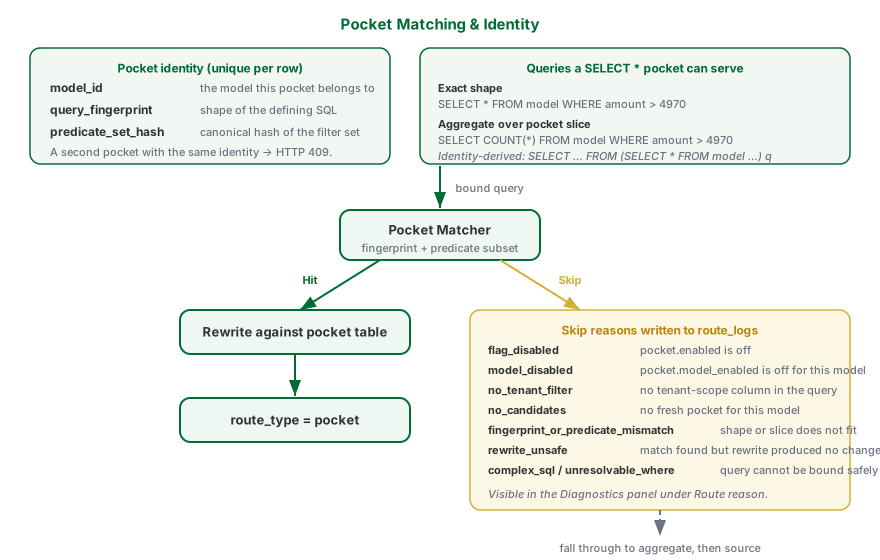
A pocket is uniquely identified by three values:
| Part | Meaning |
|---|---|
model_id | The model the pocket belongs to. |
query_fingerprint | A stable hash of the defining SQL's shape (projection, measures, grain). |
predicate_set_hash | A stable hash of the sorted canonical form of the pocket's predicates (column, operator, value). |
Two pockets on the same model with the same query shape but different filter values are distinct rows. An attempt to create a second pocket with the same identity returns HTTP 409 and no row is inserted — the existing pocket is left alone. The automated optimiser follows the same rule silently, so duplicate candidates do not pile up errors.
The pocket's source table list is not a stored field. It is parsed from the defining SQL each time it is needed, so the SQL is the single source of truth.
Pocket table properties
| Property | Description |
|---|---|
| Target | The data target where the pocket is stored. A target is required. |
| Defining SQL | A model-subset SELECT of the form SELECT * FROM <model_slug> [WHERE ...] [ORDER BY ...] [LIMIT ...]. No trailing semicolon. |
| Schedule | Cron expression controlling when the Scheduler rebuilds the pocket. |
| Schedule enabled | When off, no automatic refreshes run. Manual refresh still works. |
The default refresh strategy is full refresh — the pocket is rebuilt from scratch on each run. Optional incremental mode is considered when incremental_column is set, but it is used only when the shared refresh driver can prove complete watermark coverage for every table in the captured deployed model snapshot. Under the current single-column contract, that proof exists only for a one-table snapshot; a multi-table pocket always takes the full-refresh path (Bug-8745).
Incremental refresh re-reads only the rows whose incremental column changed since the last successful refresh and replaces those rows in the cache. It also checks which rows the source still produces at all, so a row that was deleted at the source — or that stopped matching the pocket's WHERE clause — is removed from the cache too. The one thing it still cannot see is an update that leaves the incremental column unchanged: if your source edits a row without touching its updated_at, that edit is invisible to every incremental run. Choose an incremental column your source genuinely bumps on every change.
Three things have to be true before an incremental top-up is even attempted, and if any is missing the pocket is simply rebuilt in full instead. You do not have to do anything; it is automatic, and a full rebuild is always correct. The Recent rebuilds table shows the mode actually applied (Full or Incremental), so an incremental setting that safely falls back because a fact key is hidden is visible rather than silent.
- The pocket must expose a row key. To replace a row, the refresh has to be able to find the copy already in the cache. It uses the primary key you declared on the model's fact table — but only if that column is actually visible in the pocket's columns. If the key column is hidden in the model, or the pocket exposes renamed business columns instead of the physical ones, there is no way to tell one cached row from another and the whole table is rebuilt. (Most models hide their fact key, so a full rebuild every run is the normal, expected behaviour.)
- The pocket must have refreshed successfully at least once before. The window to re-read is measured from the previous successful run, not from the current time, so a pocket with no previous success has nothing to measure from.
- The deployed model snapshot must have complete watermark coverage. A pocket over one model table can be covered by its single
incremental_column. A pocket over multiple joined tables cannot be proven fresh with that one column, because a dimension or lookup edit can change the joined value without moving the fact watermark. Tessallite therefore refuses the incremental leg and runs a full refresh (Bug-8745); it never silently serves the stale joined value as fresh.
Measuring the window from the last successful run is what makes a top-up safe after an outage. If the Scheduler was paused for a week, the next run re-reads a week's worth of changes, not just the last few hours — nothing that changed while it was away is skipped. The look-back hours you set are an extra cushion on top of that, for data that arrives at the source slightly late. Store a naive timestamp watermark as UTC; Tessallite evaluates that window against the source's UTC clock even when the source session uses an ahead-of-UTC timezone. Offset-aware timestamps keep their instant semantics.
Before every top-up, Tessallite checks one thing about your source: for every row the source has right now, does the cache already hold that row unchanged, or is the row inside the window we are about to re-read? If the answer is no for even one row, it quietly rebuilds the whole pocket instead of patching. You see a slower run; you do not see a wrong number.
That check is what catches the awkward cases a "recently changed" window cannot: a row that only starts matching because a table it joins to was loaded later, and a correction file that restates an existing row but stamps it with an old business date. Both are invisible to the window itself, and both are caught.
The current-key scan, changed-row scan, and patch share one repeatable-read source snapshot. A row inserted or deleted while the refresh is running therefore cannot appear in only one of the two scans.
Three honest limits remain, so you know what a top-up does and does not promise:
- If your source changes a row without changing its incremental column, nothing can see it. That is not a Tessallite limitation — no incremental refresh anywhere can detect a change its own change-marker did not record, and the check above cannot either, because the row still looks unchanged. The same applies to a row whose incremental column is empty: there is nothing to compare, so the row is treated as unchanged. Pick a column your source genuinely fills in and updates on every write.
- A multi-table pocket is always rebuilt in full under the current product contract. This is deliberate: with one
incremental_column, Tessallite cannot prove that every joined table's changes are covered. If a fact total was cached as 500 and a joined FX-rate edit makes source truth 700 without moving the fact watermark, the next refresh uses full CTAS so the pocket cannot report 500 as fresh. Complete per-table watermark metadata would be required before a future product change could safely allow joined incremental refreshes (Bug-8745). - If a top-up runs while your source is halfway through a bulk reload, it can briefly disagree with the source. Tessallite detects that on the very next run and repairs it then, so the disagreement lasts one refresh cycle rather than persisting. If your loads are large and non-atomic, schedule pocket refreshes outside the load window.
One thing to keep in mind about speed: a top-up still reads the source twice (once for the changed rows, once to check which rows still exist). What it saves is the writing, not the reading. Do not expect it to be dramatically faster than a full rebuild on a small pocket.
One exception is automatic, and you do not have to think about it. If the model has been deployed or reverted since the pocket was last built, or the pocket is currently marked stale or failed, the very next refresh is always a full rebuild even when an incremental column is set. The reason is worth understanding: a top-up only re-reads the recent window, so every older row in the cache would still hold numbers calculated from the previous version of the model. You would end up with one table holding two different definitions of the same measure, and nothing on screen would tell you. Rebuilding the whole table is slower for that one run, and it is the only way to guarantee every row in the cache means the same thing. After that run, incremental top-ups resume only for an eligible single-table model with proven coverage.
Refresh trigger: schedule or source change
Each pocket refreshes one of two ways, chosen by the Refresh trigger setting in the pocket drawer:
- On a schedule — the pocket rebuilds on the cron schedule you set, just like an aggregate. Use this when the source updates on a predictable rhythm.
- On source change — the pocket rebuilds automatically whenever the source schema for this model changes, with no cron schedule at all. Use this when structural changes to the source are the thing you actually need to keep up with, and you would rather not guess a cadence. (The daily drift sweep is what detects the change and fires the rebuild, so a source-change refresh happens shortly after the change is noticed, not the instant it occurs.)
When a pocket stops earning its keep
A pocket that has been refreshed but that no query has matched since its last refresh is flagged with a "No matches since refresh" badge, and the panel raises a model-level alert counting how many pockets are in that state, along with the most common reason queries skipped them over the last seven days. A fresh pocket nothing routes to is pure cost — storage and refresh work for no benefit. Treat the badge as a prompt to re-scope the pocket's defining SQL so it matches the queries people actually run, or to retire it.
The model-subset contract
A pocket is a horizontal slice of its model, expanded to physical SQL at refresh time by the same join pipeline the gateway uses for ad-hoc model queries. The defining SQL must therefore stay inside a small, predictable shape:
SELECT * FROM <model_slug> [WHERE ...] [ORDER BY ...] [LIMIT ...]The following are rejected at create / validate / refresh time and reported as a structured violation list (each with a code, a message and a one-line suggestion):
| Code | What it means |
|---|---|
FROM_NOT_MODEL | FROM references a physical table or unknown name instead of the model slug. |
MULTIPLE_FROM_TABLES | More than one table in FROM. |
JOIN_NOT_ALLOWED | A JOIN was used. Pockets cache the model's join output, not their own. |
GROUP_BY_NOT_ALLOWED / HAVING_NOT_ALLOWED / DISTINCT_NOT_ALLOWED | Aggregation keywords. Use an aggregate, not a pocket. |
AGGREGATE_NOT_ALLOWED / WINDOW_NOT_ALLOWED | SUM/COUNT/AVG/etc. or window functions. |
SUBQUERY_NOT_ALLOWED / SET_OP_NOT_ALLOWED / CTE_NOT_ALLOWED | Subqueries, UNION/INTERSECT/EXCEPT, or WITH clauses. |
SELECT_MUST_BE_STAR | An explicit projection list. Pockets must SELECT * so the matcher can serve any sub-projection. |
WHERE_UNKNOWN_COLUMN / ORDER_BY_UNKNOWN_COLUMN | A column reference that does not resolve to a model dimension or measure. |
EMPTY_SQL / PARSE_ERROR / NOT_SELECT / MODEL_MISSING | Trivial shape failures. |
Authoring workflow
- Open the model in Model Builder.
- Click Pocket Tables in the Toolbelt.
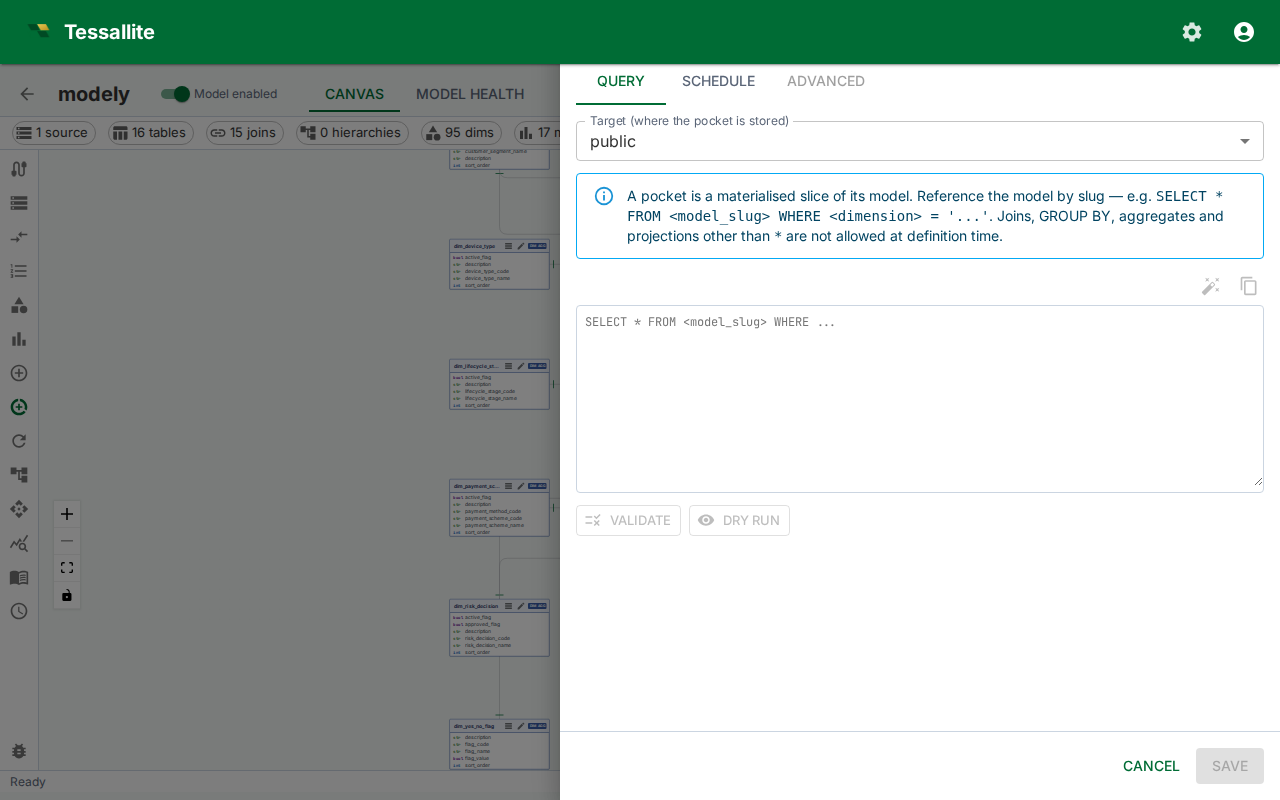
- Click New Pocket. The drawer opens on the Query tab.
- Pick a Target and type the Defining SQL into the editor. No separate source-table input is needed — the source is read from the SQL.
- Click Validate. The service parses the SQL and checks the model-subset contract. The result banner reports the stage (
parseorsubset) and, on failure, lists the violation codes and suggestions. - Click Dry run to execute
COUNT(*)against the defining SQL. The banner shows row count and elapsed milliseconds. Dry run requires a target connection; the statement timeout is capped by the system settinggateway.router_client_timeout_xlong. - Switch to the Schedule tab. Turn the Schedule enabled switch on, pick a cron expression with the picker, and review the recent run history.
- Click Save. Create-mode saves the pocket and its refresh policy in one step. The Scheduler queues the first build as soon as the policy is enabled. If a pocket with the same identity already exists, the drawer surfaces an error banner and no duplicate is created.
Closing the drawer with the X, Cancel, or a click outside after you have edited the target, SQL, cron, or enabled switch prompts for confirmation before discarding your changes.
When the checker cannot be reached
Every one of those steps — Validate, Dry run, and Save — asks the query service to read your SQL first. If that service is briefly unavailable (it is being upgraded, or the network hiccups), Tessallite will not guess. It stops and shows:
The query validator could not be reached, so your SQL could not be checked. It has not been rejected. Try again in a moment.
Read that message carefully, because it is saying something different from a normal failure:
- "Not checked" is not the same as "wrong". Your SQL has not been judged at all. Nothing is wrong with it as far as anyone knows.
- Nothing was saved. The pocket was not created and the old one was not changed.
- The fix is to wait and click again. These outages are usually seconds long. If it keeps happening for more than a few minutes, tell your administrator — the query service is down, not your model.
Why does Tessallite refuse instead of just saving it? Because a pocket table is a stored copy of some of your data, and the check is what proves the copy really matches the model. If Tessallite saved an unchecked pocket, the mistake would not appear now — it would appear later, as a report quietly showing the wrong numbers, with nothing on screen to say anything went wrong. A message you can see and retry is much cheaper than a wrong number nobody notices. This is the same reason Tessallite will not save an unchecked scratchpad measure.
A message that names an actual problem in your SQL — a misspelled column, a table that is not part of the model — is the other case entirely. That one is a real verdict, and re-clicking will not change it; fix the SQL.
Edit mode
Editing an existing pocket is scoped to scheduling. The target and defining SQL are read-only after creation — delete and recreate the pocket if the SQL needs to change. The drawer exposes a Refresh now button in the header to trigger an immediate full rebuild without waiting for the scheduled window.
Drift handling
When the underlying model changes — a referenced dimension is removed, the slug is renamed, a JOIN is taken out — the next refresh re-runs the model-subset validator before touching the target. If the pocket no longer fits the model, it is flagged status='failed' with a failure_reason carrying the structured violation list. Failed pockets are no longer routed to. Once the model is fixed, the next refresh retries the pocket and rebuilds the materialised table. No manual intervention is required.
The Pocket Tables list shows the failed status alongside stale so you can see drifted pockets at a glance and either fix the model or delete the pocket.
Schedule semantics
The Scheduler evaluates enabled pockets on each tick. A pocket is due when the previous cron-scheduled fire time is newer than the pocket's last_refresh_at. Manual refreshes (via Refresh now or the API) do not interfere with the cron cadence — they rebuild immediately and update last_refresh_at.
| Preset | Cron | When it runs |
|---|---|---|
| Every hour | 0 * * * * | At the top of every hour |
| Every 6 hours | 0 */6 * * * | 00:00, 06:00, 12:00, 18:00 UTC |
| Daily at 02:00 | 0 2 * * * | Once per day at 02:00 UTC |
| Weekly (Sunday 03:00) | 0 3 * * 0 | Sundays at 03:00 UTC |
Pickers accept any valid five-field cron expression. All times are UTC.
How matching works
The Router prefers a pocket when one fits before it considers an aggregate. A pocket fits a query when:
- Shape matches. Either the exact defining-SQL fingerprint, or the filter-only fingerprint — so a
SELECT *pocket can also serve aggregate queries (SELECT COUNT(*),SELECT SUM(amount)) and identity-derived-table queries (SELECT … FROM (SELECT * FROM model WHERE …) q) over the same filter slice. - Slice matches. Every pocket predicate is implied by the query's predicates on the same column — the query's slice is contained in the pocket's slice. The query may add extra predicates to narrow further; it may not broaden beyond the pocket.
When the Router passes over a pocket, the reason is written to the route log and shown in the Diagnostics panel. The reasons are:
| Reason | Meaning |
|---|---|
flag_disabled | pocket.enabled is off at the system level. |
model_disabled | pocket.model_enabled is off for this model. |
no_tenant_filter | pocket.require_tenant_filter is on and the query has no tenant-scope column. Set pocket.tenant_scope_from_context to accept the authenticated session's tenant in place of an explicit filter. |
no_candidates | No fresh pocket exists for this model. |
fingerprint_or_predicate_mismatch | A pocket exists but its shape or slice does not fit this query. |
rewrite_unsafe | A pocket matched but rewriting did not change the query, so the source was used instead. |
complex_sql / unresolvable_where | The query could not be bound into an intermediate representation safely. |
from_outside_model | A defensive guard caught a pocket whose defining SQL points outside the model. With the model-subset contract enforced at create time this should not occur in practice. |
Advanced tab
The Advanced tab (edit mode only) is read-only metadata: physical table name, status, created timestamp, last refresh, row count, storage bytes, and hit count. Use it to confirm the pocket is being consumed by the Router and to diagnose storage pressure.